Generate the batch
Run Data Merge with separate, labelled text frames for each recipient’s name and unique certificate ID.
For Affinity certificate makers
One PDF per recipient, named with their certificate ID and name. Finish the batch inside Affinity.
A native exporter in development for training providers, course organisers and designers who already create certificates with Affinity Data Merge.
Notify me when the $19 exporter is availableProposed US$19 onceIn development. No payment collected.
Inspect the actual example filesFor an existing one-certificate-per-page merge on Mac. Check the version and template setup.
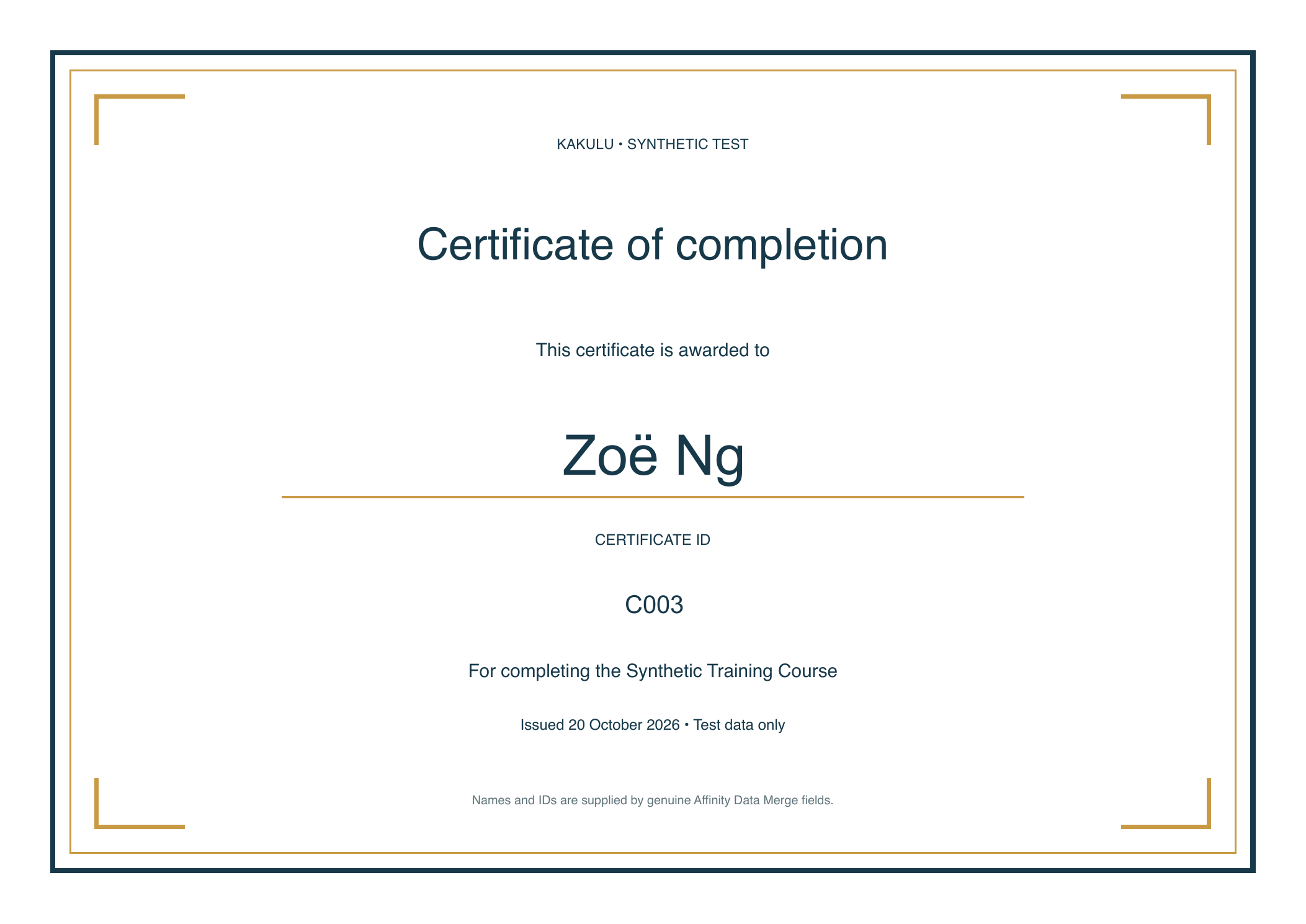
Fictional recipient · Actual Affinity export
See the sample and its verification details.
The finishing job
A merged document is only part of the delivery. Each person still needs the right file. Kakulu’s proposed shortcut removes the separate combined-PDF export and external splitting pass from work you repeat.
Run Data Merge with separate, labelled text frames for each recipient’s name and unique certificate ID.
The preview reads the resolved text from each page. Check the page, name, ID and proposed filename together.
Choose an Affinity PDF preset and a fresh output folder. Open and inspect the finished files before sending them.
Prepare the template and script once, then reuse them for later batches. You still review the mapping and inspect the output. Customer time savings have not been measured.
Open the actual files
Choose a fictional recipient and inspect their native PDF. The batch includes two Alex Riveras with different IDs, accented names and the original certificate design.
Real output. Synthetic data.
Originally exported in Affinity.
Independently checked.
Original probe v2.0.0, on Affinity 3.3.1.4940 for macOS. The public copies have document metadata removed; page content and appearance are preserved.
These files do not prove that reconstructed preview 0.2.0-preview.1 works natively.
Original native sample · Page 3 of 6
C003_Zoë_Ng.pdfOpen the actual PDF and check the recipient and ID against its filename.
Open this certificate| Page | Recipient | ID | Individual PDF |
|---|---|---|---|
| 01 | Alex Rivera | C001 | C001_Alex_Rivera.pdf |
| 02 | Alex Rivera | C002 | C002_Alex_Rivera.pdf |
| 03 | Zoë Ng | C003 | C003_Zoë_Ng.pdf |
| 04 | José Alvarez | C004 | C004_José_Alvarez.pdf |
| 05 | Mei Tan | C005 | C005_Mei_Tan.pdf |
| 06 | Sam O'Neill | C006 | C006_Sam_ONeill.pdf |
No email needed. The ZIP includes all six PDFs, the expected filename mapping and a short explanation. The sample comes from the original probe, not the current preview release.
An honest comparison
Free tools can already name files, handle repeated names and save configurations. Kakulu’s possible advantage is a shorter finishing path for people who want to stay in Affinity.
Strong free alternative
PDF Split & Rename reads selected text regions; it does not inherently need another CSV. Saved settings can reduce repeat setup.
A sensible choice for occasional batches or an external workflow you already like.
Proposed native workflow
Reuse the named template frames and saved script. No intermediate combined PDF or ZIP extraction is required by the exporter.
The tradeoff: first-time frame setup, scripting permissions and a narrow compatibility boundary. Net time saving has not been measured.
You would be paying for a documented native utility with a defined supported workflow. Our free guide helps you finish the job using any of these routes.
A specific workflow
This is a finishing tool for an existing Affinity merge. It does not design certificates or repair source data.
Setup, preview and troubleshootingExact package version and compatibility limits.kakulu_name and kakulu_id. Enable scripting and limit filesystem access to your output workspace.Check the proposed workflow
Three checks for this preview’s narrow scope. This does not inspect your document or verify native compatibility.
No document or recipient data is requested. Only the result category is recorded with the page session.
Free help for the whole batch
Use these resources before choosing an export route. No signup, certificate upload or purchase is needed.
Download a worksheet, keep names and IDs together, and handle accents and commas.
Get the worksheet →Before deliveryWork through duplicate names, shuffled lists and the actual files you will send.
Use the checklist →When a step goes wrongSeparate source, merge, PDF export and filename problems before changing the workflow.
Troubleshoot the batch →Interested in a shorter finishing step?
We’re preparing a small exporter for compatible Affinity certificate batches.
The intended purchase includes the reusable exporter, version-specific setup instructions and a useful sample check.
This is a request for notification, not a preorder or commitment. No release date is promised. Price is proposed before any applicable buyer tax.
The details behind the example
Original probe v2.0.0: six Batch A PDFs exported in Affinity 3.3.1.4940 on macOS and independently inspected. Contents, names, IDs, filenames, accents and artwork matched. Both Alex Rivera certificates remained separate.
Reusable 0.1.0: historical local checks only. Its source package could not be recovered.
Reconstructed 0.2.0-preview.1: new code based on the recovered original probe, with local checks. On 22 October 2026, the owner reported successful use. No additional independent native-output verification is claimed. Customer time savings and demand remain unverified.
Read the exact release boundariesThe intended filename uses a unique certificate ID plus the recipient’s name. Matching names can therefore remain separate. The reconstructed preview rejects duplicate IDs and requires a new output subfolder instead of replacing existing files.
Those guards are locally checked. The owner’s successful-use report is not a separately recorded test of each repeat-use or overwrite case.
It reads resolved names and IDs from the generated document. You still check the data, long names, layout and actual PDFs. It does not repair templates, certify credentials or send certificates.
The proposed offer is help with the documented workflow on explicitly listed builds. Affinity’s scripting SDK is in beta. Bespoke template repair and lifetime compatibility with future versions are not part of the proposed US$19 one-time product. Final support terms would be stated before any sale.
Evidence status · 23 October 2026. The original native sample is independently verified. The reconstructed preview has local checks and owner-reported successful use on 22 October; no additional independent native result is claimed. No customer purchase, proven price acceptance or measured time saving is claimed. Workflow sources and free alternatives.